Naming Conventions
When using geonodes, a question rapidly arises: What is the name of the method which implements the Node I want ?
Naming conventions are used to easily answer to this question.
Important
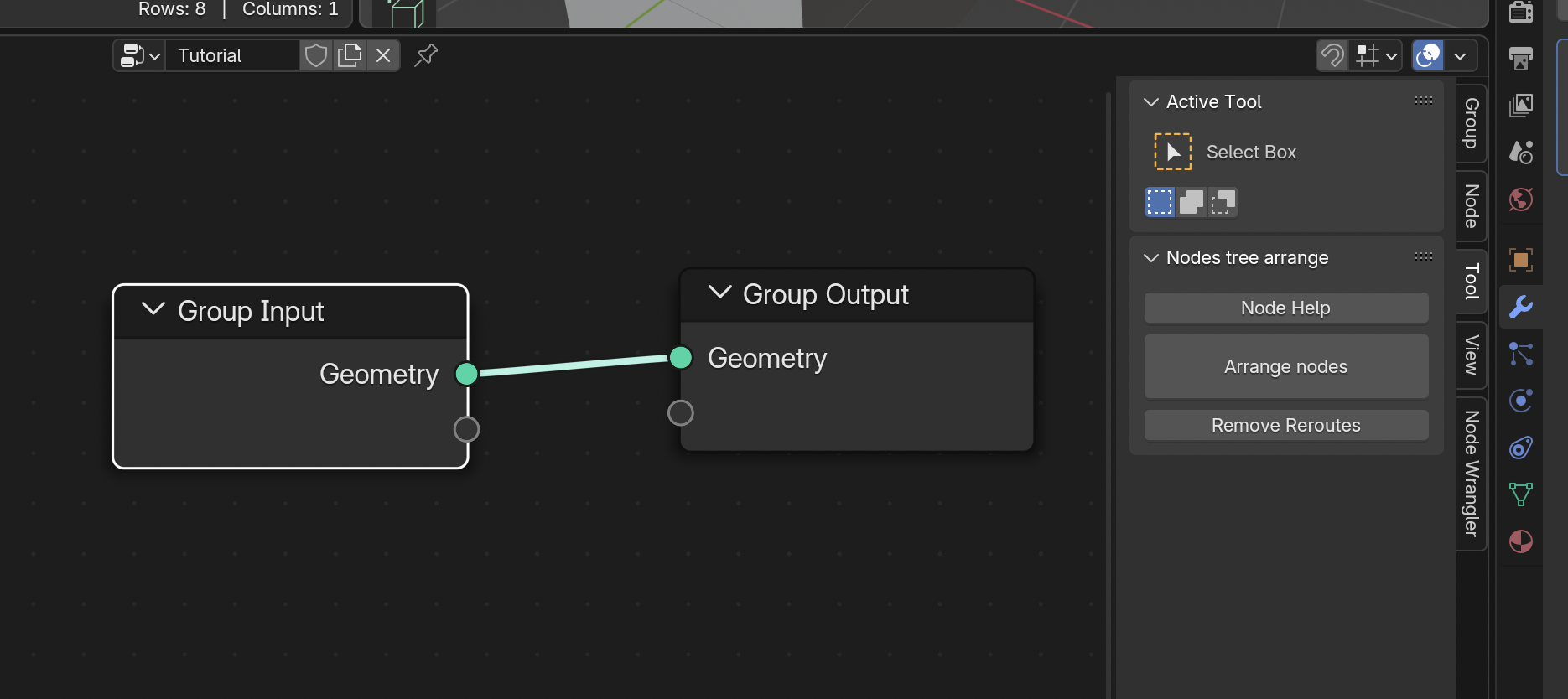
In addition to the rules below, you can use the button [Node Help] in the right Tool panel in the Geometry Nodes editor. This button generates the implementations of the selected nodes into a script named 'Node Help'.
Node names
Naming conventions are such that method names can be easily deduced from the node name.
-
RULE 1 : method names are built from the name of the node using the snake_case convention:
- Set Material : set_material
- Store Named Attribute : store_named_attribute
-
RULE 2 : when the node creates a new instance of the socket, it is implemented as a constructor class method using CamelCase convention:
- Cube : constructor class method Cube of Mesh
- Combine XYZ : constructor class method Combine of Vector
- Bézier Segment : constructor class method BezierSegment of Curve
-
RULE 3 : the name of the socket data type is omitted when redundant:
- Curve to Mesh : Curve.to_mesh method
- Mesh to Points : Mesh.to_points method
- Curve to Points : Curve.to_points method
- Volume to Points : Volume.to_points method
- Mesh Line : Mesh.Line constructor
- Curve Line : Curve.Line constructor
-
RULE 4 : Set xxx are implemented as properties when possible:
- Set Position : position and offset properties of geometry :
mesh.position = vandmesh.offset = v - Set Radius : radius property of Cloud.points and Curve.points :
cloud.points.radius = vandcurve.points.radius = v - Set Tilt : tilt property of Curve.points :
curve.points.tilt = v - Set Handle Type : handle_type property of Curve.points :
curve.points.handle_type = 'FREE'
- Set Position : position and offset properties of geometry :
The example below applies this set fo rules:
from geonodes import *

with GeoNodes("Method names"):

    # ----------------------------------------------------------------------------------------------------
    # RULE 2 : Constructor nodes in CamelCase
    #
    # Primitive nodes 'Cube', 'Points' and 'Bézier Segment' are
    # implemented as constructors of their Geometry

    cube = Mesh.Cube()
    cloud = Cloud.Points()
    bezier = Curve.BezierSegment()

    # ----------------------------------------------------------------------------------------------------
    # RULE 2 : Constructor nodes in CamelCase
    # RULE 3 : Omit class name
    #
    # Primitive nodes 'Mesh Line' and  'Curve Line' are implemented as
    # constructors of their Geometry, omitting the name of the class

    mesh_line = Mesh.Line()
    curve_line = Curve.Line()

    # ----------------------------------------------------------------------------------------------------
    # RULE 1 : Nodes name in snake_case
    #
    # Nodes 'Subdivision Surface', 'Triangulate', 'Set Position' are implemented as method
    # of their geometry using the snake_case version for their name

    cube.subdivision_surface()
    cube.triangulate()
    curve_line.set_position()

    # ----------------------------------------------------------------------------------------------------
    # RULE 1 : Nodes name in snake_case
    # RULE 3 : Omit class name
    #
    # In the snake_case version of the nodes 'Fill Curve', 'Deform Curves on Surface',
    # 'Subdivide Mesh' the name of the geometry is omitted

    mesh = Curve.Circle().fill()
    curve_line.resample(count=17)
    cube.subdivide()

    # ----------------------------------------------------------------------------------------------------
    # RULE 4 : setters and getters are properties
    #
    # The nodes 'Set Position' and 'Set Radius' are also implemented as properties

    mesh.position += (1, 2, 3)
    mesh.offset = (1, 2, 3)
    cloud.radius = 1.

    # Join the geometries and to output
    Geometry.Join(cube, cloud, bezier, mesh_line, curve_line, mesh).out()
Geometry or Domains methods
Blender Geometry Nodes exposes one single Geometry type. On the other hand, GeoNodes provides one class per geometry type : Mesh, Curve, GreasePencil, Cloud, Instances, Volume which are subclasses of the generic Geometry class.
Nodes are implemented on their geometry classes: - Interpolate Curves, Resample Curve, Reverse Curve : implemented only on Curve class - Extrude Mesh, Flip Faces, Mesh Boolean : implemented only on Mesh class
Nodes needing a Domain parameter are implemented on Domain, not Geometry : - Store Named Attribute : implemented on all domains - Extrude Mesh : implemented on Mesh.points, Mesh.edges and Mesh.faces - For Each Element : implemented on all domains
Node sockets and parameters
To be fully configured, a node also needs values for its parameters. The method arguments provides the required initial values.
The following conventions are used:
-
RULE A : arguments for sockets are built as the snake_case version of their name:
- Value socket : value
- Geometry socket : geometry
- Instance Index socket : instance_index
-
RULE B : sockets are given in their order in the node. The parameters come after:
float.map_range(0, 1, 10, 20)is equivalent tofloat.map_range(from_min=0, from_max=1, ...)
-
RULE C : Selection socket is omitted and is passed as item index of Geometry
- Don't write
mesh.set_id(selection=sel, ...)but write insteadmesh[selection].set_id(...)
- Don't write
-
RULE D : arguments for parameters use the python parameter name:
- Node Volume to Mesh has the parameter resolution_mode :
mesh = vol.to_mesh(..., resolution_mode='GRID')
- Node Volume to Mesh has the parameter resolution_mode :
-
RULE E : domain parameter is omitted, it is taken from the calling domain:
- Don't write
mesh.store_named_attribute(domain='FACE')but write insteadmesh.faces.store_named_attribute()
- Don't write
-
RULE F : data_type parameter is omitted, it is deduced from the attribute type:
- Don't write
sphere.sample_uv_surface(value=a, data_type='VECTOR')but simply write `sphere.sample_uv_surface(a)
- Don't write
-
RULE G : nodes having a mode like parameter are implemented once per possible value:
- You can write
mesh.raycast(mapping='INTERPOLATED')or alternativelymesh.raycast_interpolated()
- You can write
Note
Use the button [Node Help] in the right Tool panel in the Geometry Nodes editor to see all the methods which implement the selected nodes.
from geonodes import *

with GeoNodes("Argument names"):

    # ----------------------------------------------------------------------------------------------------
    # RULE A : socket arguments in snake_case

    sphere = Mesh.UVSphere(segments=16, rings=12, radius=1.)
    sphere.merge_by_distance(distance=.1)

    # ----------------------------------------------------------------------------------------------------
    # RULE B : sockets ordered as in the node, parameters are placed after

    sphere.merge_by_distance(distance=.1, mode='All')

    # ----------------------------------------------------------------------------------------------------
    # RULE C : Selection socket is set by item index
    #
    # Don't write:
    # sphere.set_position(selection=nd.index < 5, position=(1, 2, 3))

    sphere[nd.index < 5].set_position(position=(1, 2, 3))

    # ----------------------------------------------------------------------------------------------------
    # RULE D : parameter arguments take the parameter name
    #
    # Node 'Merge by Distance' owns a parameter named 'mode'

    sphere.merge_by_distance(mode='All')

    # ----------------------------------------------------------------------------------------------------
    # RULE E : domain parameter is taken from the calling domain
    #
    # Don't write:
    # sphere.set_shade_smooth(shade_smooth=True, domain='FACE')

    sphere.faces.set_shade_smooth(True)

    # ----------------------------------------------------------------------------------------------------
    # RULE F : data_type parameter is omitted, it is deduced from the argument type
    #
    # Don't write
    # b = sphere.sample_uv_surface(value=a, data_type='VECTOR')
    # data_type will be deduced from the type of variable a

    a = Vector()
    b = sphere.sample_uv_surface(value=a)

    # ----------------------------------------------------------------------------------------------------
    # RULE G : nodes having a _mode_ like parameter are implemented once per possible value

    # Mix Color
    col1, col2 = Color(), Color()

    # You can mix using the factor_mode parameter
    col = col1.mix(col2, factor_mode='UNIFORM')

    # You can alternatively used the methods suffixed by the mode
    col = col1.mix_darken(col2)
    col = col1.mix_multiply(col2)
    col = col1.mix_burn(col2)

    sphere.out()
Returned values
The general rule is that the methods return the first output socket of the node.
When the node has other output sockets, they can be accessed in two ways:
- using the node property of the returned socket: a = socket.node.xxx
- or using the peer sockets naming convention which exposes peer output sockets
as properties of the socket itself. In that case, if the name of the peer output
socket interfers with another socket property, you can suffix the name with '_'.
The example below illustrates how to access output sockets:
from geonodes import *

with GeoNodes("Returned Values"):

    # ---------------------------------------------------------------------------
    # Simple example
    # ---------------------------------------------------------------------------

    #  Node 'Cube' returns two output sockets:
    # - Mesh
    # - UV Map
    # The returned value has a property named uv_map_

    cube = Mesh.Cube()

    # The following lines are equivalent
    uv_map = cube.node.uv_map
    uv_map = cube.uv_map

    # ---------------------------------------------------------------------------
    # Reading info
    # ---------------------------------------------------------------------------

    # The returned socket is the first one: point_count
    # Let's name it info for the sake of clarity
    info = cube.domain_size()

    # The other sockets can be read
    face_count = info.face_count
    edge_count = info.edge_count

    # Peer sockets can be read from any socket
    point_count = face_count.point_count
    # The two sockets wrap the same blender socket
    assert info._bsocket == point_count._bsocket

    # ---------------------------------------------------------------------------
    # Names collision
    # ---------------------------------------------------------------------------

    # The returned socket is the first one : 'Transform'
    # Let's name if info for the ssake of clarity
    transfo = nd.self_object.info()

    # Location peer socket
    loc = transfo.location

    # But rotation and scale are properties of Transformation class
    rot0 = transfo.rotation # rotation property of transfo

    # To read the peer socket, we need to suffix the name with _
    rot1 = transfo.rotation_
    assert rot0._bsocket != rot1._bsocket

    # ---------------------------------------------------------------------------
    # Example
    # ---------------------------------------------------------------------------

    #  Node 'Extrude Mesh' returns three output sockets:
    # - Mesh
    # - Top
    # - Side

    ico = Mesh.IcoSphere(subdivisions=2)

    # Extrude 30% of the faces
    ico.faces[Boolean.Random(probability=.3)].extrude(offset_scale=.4)

    # Duplicate extruded faces with a 0 scale extrusion
    ico.faces[ico.top_].extrude(offset_scale=0)

    # --- ico.top_ is needed twice, let's use an intermediary variable

    top = ico.top
    ico.faces[top].scale(scale=.5)

    # Another extrusion
    ico.faces[top].extrude(offset_scale=1)

    # --- Let's now dig the sides

    ico.faces[ico.side].extrude(offset_scale=0)
    top = ico.top
    ico.faces[top].scale(.8)
    ico.faces[top].extrude(offset_scale=-.01)

    # Output
    (ico + cube.set_position(offset=(5, 0, 0))).out()