Scripting nodes overview
All nodes belong to a tree. Two tree types are available: - geonodes - shadernodes
Note
To get the maximum benefit of geonodes, you must be familiar with both python and Blender Geometry Nodes.
How it works
Each Geometry Nodes output socket is wrapped by a class:
- A Float instance keeps a reference to an output socket of type VALUE
- A Geometry instance keeps a reference to an output socket of type GEOMETRY
Geometry Nodes are methods, functions or operators working on the GeoNodes classes. The arguments of a method are connected to the input sockets of the node. The method returns a class refering to one of its output socket, or, rarely, to the node itself.
from geonodes import *

with GeoNodes("Socket Init"):

    # Get the Group Input geometry
    geometry = Geometry()

    # Plug the geometry to the Group output node
    geometry.out()

    # Create sockets from their node primitives
    with Layout("Primitives"):
        i = Integer(123)
        f = Float(3.14)
        s = String("A string")
        b = Boolean(True)
        v = Vector((1, 2, 3))
        red = Color("Red")
        green = Color("#00FF00")
        blue = Color((0, 0, 1))
        r = Rotation((pi, pi, pi/2))

    # The key word argument name indicates the following are Group input sockets
    # The value is the default value
    i = Integer(123, name = "Integer")
    f = Float(3.14, name = "Float")
    s = String("A string", name = "String")
    b = Boolean(True, name = "Boolean")
    v = Vector((1, 2, 3), name = "Vector")
    red = Color("Red", name = "Color 0")
    green = Color("#00FF00", name = "Color 1")
    blue = Color((0, 0, 1), name = "Color 2")
    r = Rotation((pi, pi, pi/2), name = "Rotation")

    # If the initial value is a string, the value is a named attribute
    # Named Attribute 'Integer'
    with Layout("Named Attributes"):
        i = Integer("Integer")
        # Named Attribute 'Float'
        f = Float("Float")

    # Creating Geometries
    with Layout("Creating geometries"):
        cube = Mesh.Cube()
        curve = Curve.Spiral()
Blender Setup
Create a new script in Scripting tab in Blender. You can setup this tab in order to display:
- A Text editor for python scripting
- A 3D Viewport to view the progress
- A Python Console to dump variables
- A Geometry Node Editor to view the generated nodes
Here after is an example of the recommanded setup:
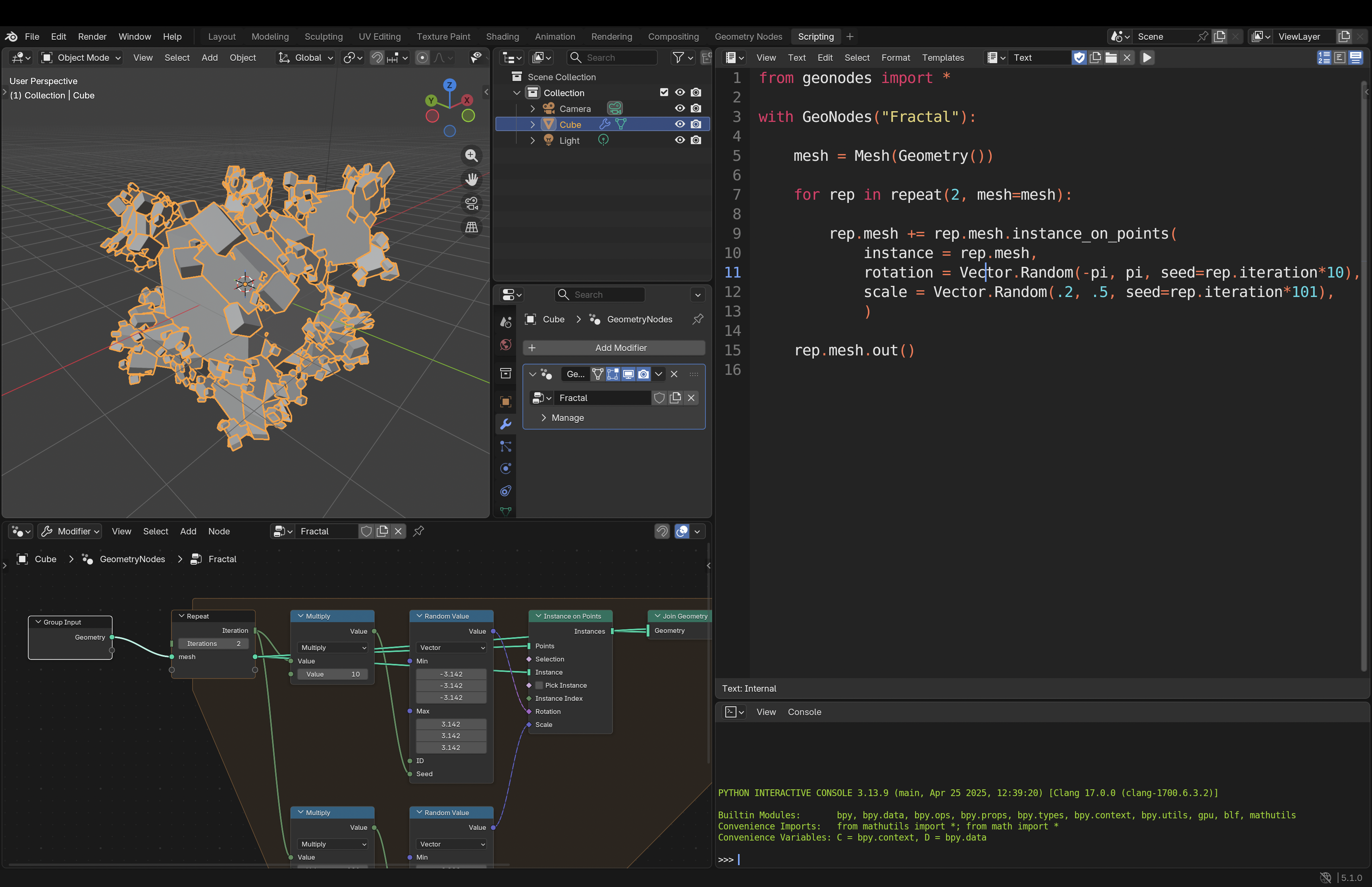
'Do Nothing' Modifier
Copy / paste the following piece of code to check that everything is properly setup:
from geonodes import *

with GeoNodes("Do Nothing"):
    Geometry().out()
A Geometry Nodes modifier has been created with the name "Do Nothing". You can use it on any object.
Note
All scripts are supposed to start with from geonodes import *.
Then, nodes must be created only in the sccope of with context.
All the code samples must be placed after the following lines:
from geonodes import *

with GeoNodes("Tutorial"):
    pass